

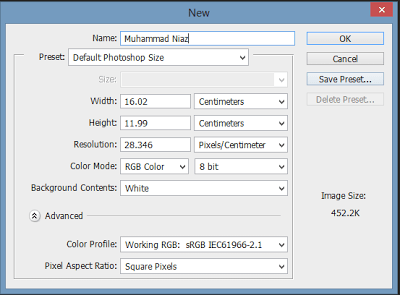
In this Tutorial You can Learn How to Creating New Canvas in Adobe Photoshop in Urdu and Hindi Language by Sir Muhammad Niaz. In any graphic designing application, work always starts by creating a work space where we want to work with our graphics. In Adobe Photoshop for creating a new canvas or work area we have to go in File>New. Then a window appears which allows us to define our new work space or canvas. In that window we have to enter that new document’s name, its width and height, screen resolution, Color mode, and page contents.
Creating New Canvas
Adobe Photoshop Home Page – Adobe Photoshop Download Link
File Size
This is usually in Kilobytes or Mega Bytes (KB/MB). The file size is important as it affects the quality of image (sharpness), storage requirement (hard disk space) and the network delivery speed (file transportation). In general the larger the file size the higher the quality of the image, the greater the storage requirements and slower the network delivery speed possible.
File Format
It means how the image is structured. File formats relate to the type of computer coding that is used to structure a digital image.
Resolution
Resolution is the number of pixels in a digital image. It is expressed as ‘ppi’ (pixel per inch) or ‘dpi’ (dots per inch). The higher the resolution the higher the quality of image and possible output size.
Bit Depth
This is the amount of color information per pixel in an image. It is measured in factor of 8 i.e. 8bit, 16bit, 24bit etc.
Color Space
The color space a digital image is in, relates to its achievable color out put. There are two prominent types:RGB (Additive color process, using Red, Green and Blue)CMYK (This is the color space used for print industry)
Share with Your Friends




Walikum Salam Aahid Malik
http://www.muhammadniaz.net/2013/06/01/learnadobephotoshop/
Class # 17 & 50 Dekh li jiye INSHALLAH ap ko Complete Samaj a jaye ga