New Updated/Repaired Link Are

MATLAB r2005a and r2005b | Password Recovery Bundle 2015| 20 days to find Amy| Backyard Football 2006 |   10 Talismans| Alpha Zylon| Hitman 1 Codename 47| ICC Champions Trophy 2013| Martial Arts Capoeira| Kaspersky Internet Security for Android | The Amazing Spider-Man 2 | Dark Souls| Dragon Ball |   CyberLink YouCam Deluxe |   Call of Duty United Offensive |   Bee Movie Game | PS3 Emulator with Bios |   Return to Castle Wolfenstein |   NBA 2K14 |   Recover MyFiles Professional 4 & 5 |   Street Racing Syndicate |   Tomb Raider Anniversary |   Starcraft and Brood War |   SWAT 4 |   Need for Speed Carbon |   DLL Suite 2013 |   Jimmy Neutron Boy Genius |   God of War 1 |   Final Fantasy VII |   Secret Files – Sam Peters | Pro Evolution Soccer 2014

Microsoft Excel

Microsoft Excel Topic 66 Using Filter to Analyze Lists

Using Filter to Analyze Lists in Microsoft Excel 2013

In this video Learning tutorial you can learn in Microsoft Excel 2013 How to Use Filter to Analyze Lists in Urdu and Hindi Language by Sir Muhammad Niaz.

Using Filter to Analyze Lists

AutoFilter

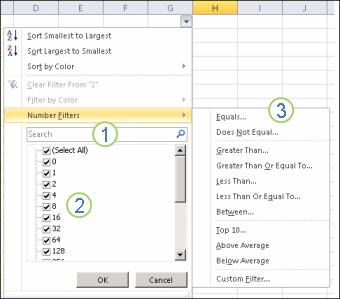
Use AutoFilter in Microsoft Excel 2013 to find values, show or hide values, in one or more columns of data. You can filter based on choices you make from a list, search to find the data that you want to see. When you filter data, entire rows are hidden if values in one or more columns don’t meet the filtering criteria. Built-in comparison operators such as “greater than” and “top 10” can show the data you want and hide the rest. That’s a big help with large worksheets or when you just want to focus on particular data ranges.

Microsoft Excel Home Page
Watch Learn and Share with Your Friends

Leave a Reply

Your email address will not be published. Required fields are marked *

Back to top button